← All updates

Save great videos and revisit them later.

Collect videos you discover in Trending to your account's library.

eThe EasyCut team··2 min read
Save what you discover, revisit when you need it.
easycut.co.kr
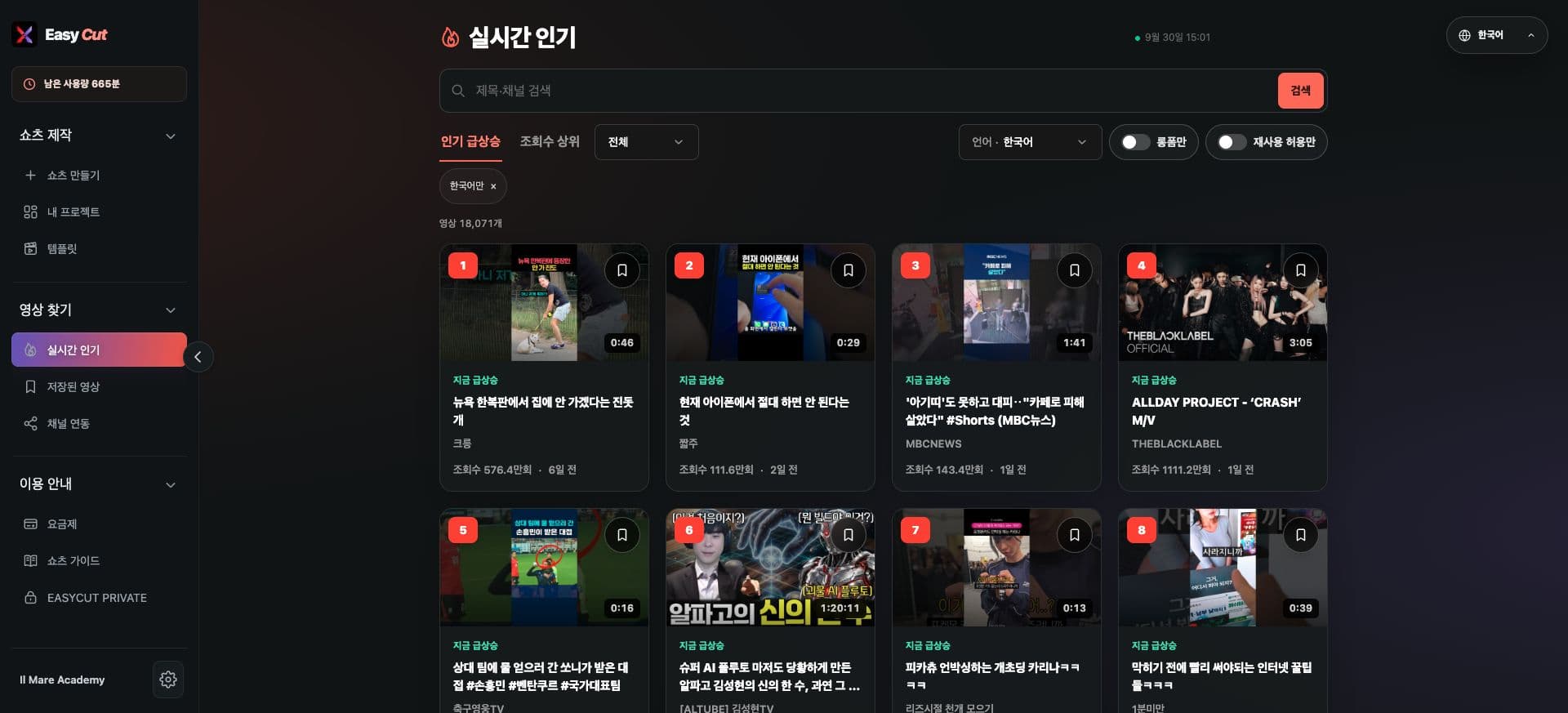
Search bar, language filter, and bookmark button in the Trending videos list

Changes

What's changed

You can save videos you're interested in using the bookmark button on the video thumbnail.

Saved videos can be rewatched in Find Videos → Saved Videos.

We've refined the bookmark and guidance display to clearly show the save status and completion notice.

See it on screen

Check the actual usage location on the screen. Tap the image to view it larger.

Actual EasyCut screen · Captured 2026.09.30 · Interface may be in Korean
  1. 1Tap this icon to save
  2. 2Language, length, reuse conditions
Search bar, language filter, and bookmark button in the Trending videos list

Search bar, language filter, and bookmark button in the Trending videos list

Actual EasyCut screen · Captured 2026.09.30 · Interface may be in Korean
Actual guidance shown when there are no saved videos in your library

Actual guidance shown when there are no saved videos in your library

How to use it

How to use

  1. 01

    Find videos you like in Trending.

  2. 02

    Tap the bookmark in the top right of the thumbnail.

  3. 03

    Check your collected list in the Saved Videos menu.

Open the feature ↗The current service opens in a new tab.

Based on the change history for 2026.09.27. Screenshots may differ from the interface at the time of the update and may be in Korean. Check your account, plan and current service notices for feature availability.

← Back to all updates